A Survey of AI Coding Abilities
Adapted from a Yale SOM Faculty Seminar on November 19, 2025 by Kyle Jensen. Kyle is a magician and I deserve almost no credit for this post.
Kyle wants you to know that much of the material here was based on a post here by HumanLayer.
The Six‑Fold Path to AI Coding “Enlightenment”
Think of AI coding as a set of levels. You don’t have to reach Level 5 to be productive, but it helps to know what’s possible.
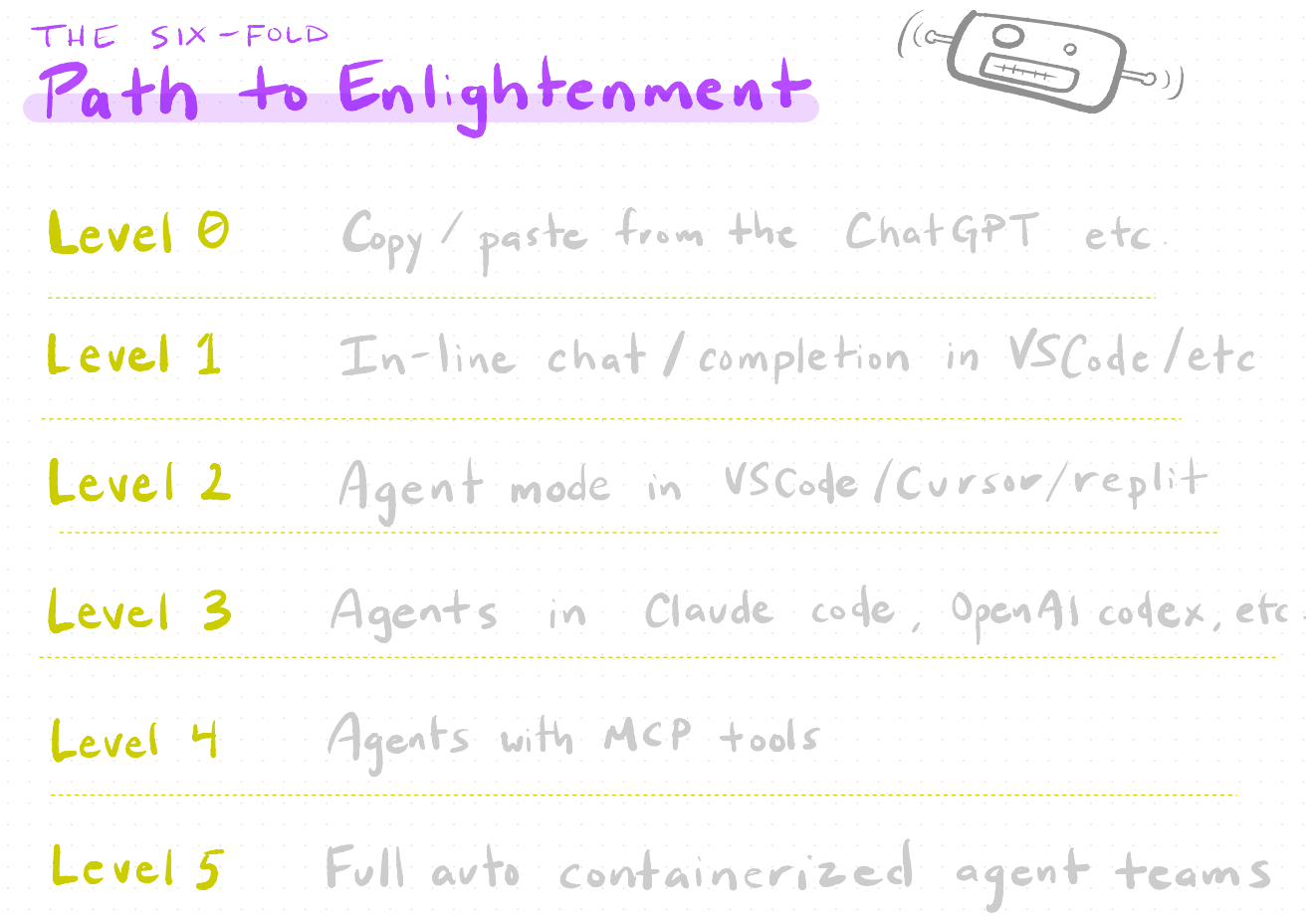
- Level 0 – You live in the browser, copy code from ChatGPT / Claude and paste into your editor.
- Level 1 – Your IDE (VS Code, Cursor, Zed, etc.) offers inline completions and inline chat
- Level 2 – You enable "agent mode" inside the IDE: the model can read files, run tests, refactor, etc.
- Level 3 – You use dedicated coding agents (Claude Code, OpenAI Codex CLI, Gemini CLI, Copilot CLI, …).
- Level 4 – You attach MCP tools (Model Context Protocol) so agents can search the web, scrape, browse, orchestrate.
- Level 5 – You orchestrate teams of agents, often in containers, with CI-like pipelines and automated workflows.
One Rule to Rule Them All
A rough mental model for AI coding performance:
\[\text{Performance} \approx \frac{(\text{correctness}^2 \times \text{completeness})}{\text{size}}\]- Correctness – Are the details right? Does the code actually run and solve the task?
- Completeness – Are all edge cases covered? Tests? Docs?
- Size – How much code / context / complexity is being juggled?
As context size grows (more files, longer prompts, giant logs), performance tends to worsen. The job is to structure work so the model can stay correct and complete without being drowned in text.
Level 0: Top Tips for Copy/Paste Coding
If you’re coding from the web UI (ChatGPT, Claude, etc.), a few small tricks go a long way.
-
Use backticks to delineate code You can help out your LLM by clearly marking code blocks and even saying what language it is – make the subtext text:
Please rewrite this function: ```python def bad(x,y): return x+y # TODO: handle type errors ``` -
All the usual prompt best practices still apply
- Role-play: “You are a senior Python engineer…”
- Chain-of-thought: Ask it to think step by step (even if you later hide that from the final output).
- Planning: “First outline a plan, then implement it in small steps.”
- Do not argue with the machine: if it’s wrong, restate constraints and try again, or start fresh.
-
Use web search tools to prime the model
- Whenever you depend on libraries, force the model to look at the docs / examples instead of “remembering”.
- Never rely on built‑in knowledge of APIs—treat it like a smart intern browsing documentation.
Anatomy of a Modern LLM Chat
Under the hood, a “chat” is a structured pipeline:

You usually see only:
- Your prompt
- The LLM’s response
…but in between, it may:
- Call tools (web search, code execution, file reads)
- Receive structured results
- Follow system + developer instructions you never see
Good AI coding tools expose more of this flow and let you customize it.
Why You Don’t Want to Write Serious Code in the Web Interface
The web UI is great for experiments and small snippets, but it’s a bad home for a real project:
- Lack of context – The model can’t see the whole repo reliably.
- Limited tool use – Your local machine has
git,grep,pytest,make, Docker, etc.; the web UI usually doesn’t. - Generic models – You often get a “generalist” model instead of something tuned for code.
- Slow feedback loops – Constant copy‑paste between browser and editor.
For serious work, move into an AI-enabled IDE or terminal tool.
Level 1: Integrated Development Environments (IDEs)
A quick comparison of the current ecosystem:
Cursor
“The most AI‑forward IDE.”
- Agent‑first UX: you primarily talk to an agent about your codebase.
- Paid tiers ($20 / $60 / $200 per month), plus a free year for students.
- Strong support for agents that read, refactor, and maintain large codebases.
VS Code + Copilot
- Excellent for basic AI code completion and inline chat.
-
Great choice if:
- You already live in VS Code.
- You benefit from GitHub integration (repos, PRs, reviews).
- Free tier for verified teachers and students.
Zed
-
Lightweight, collaborative IDE:
- Think “Google Docs for code” with live editing.
-
Good if collaboration is more important than deep agent features (for now).
Example: VS Code + Copilot
VS Code and Copilot is a great way to start, since as a student or educator you can get a subscription for free. See Paul’s post here for further discussion.
- Code completion – Predicts the next few lines as you type.
-
Inline AI chat – Ask questions right in the file:
- “Explain this function.”
- “Add a docstring and type hints.”
- Sidebar chat / plans – Have a longer conversation about a task and then apply edits.
-
Agent mode – The model can:
- Open files
- Run tests
- Apply multi‑file refactors
Which raises the question: what is an agent?
Level 2: Agent-based programming
An agent is an LLM running in a loop with tools.
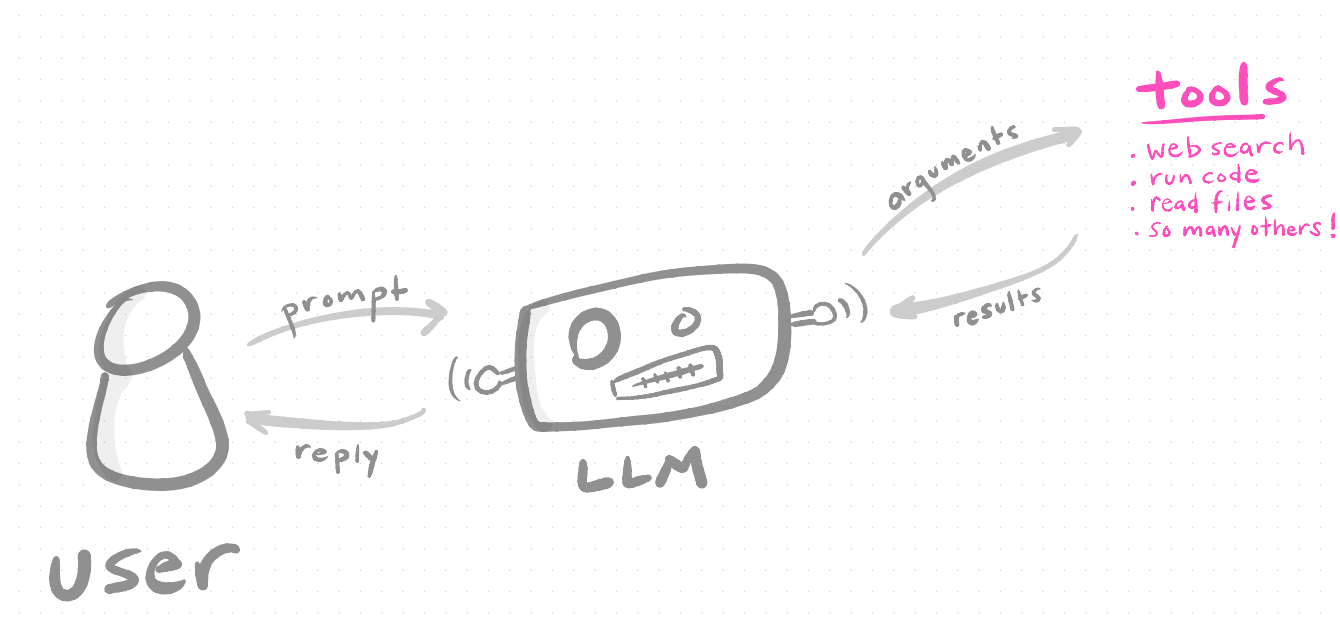
The agent repeatedly:
- Reads your instructions and its current context.
- Decides which tool(s) to use.
- Calls tools, processes results.
- Replies or loops back for more tool use.
Cursor’s Agent‑Forward Approach
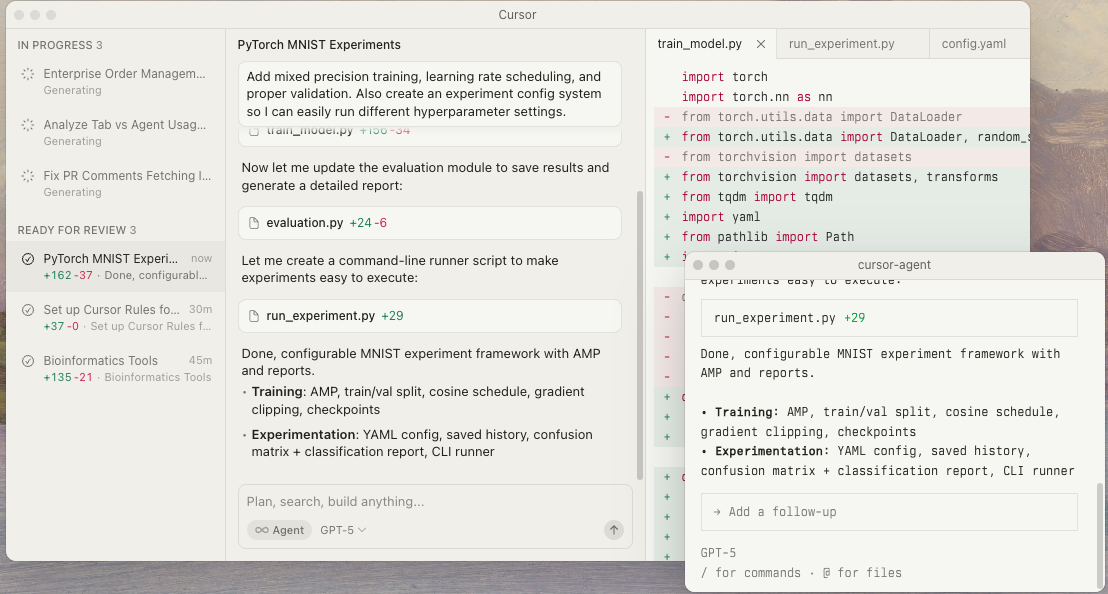
Cursor is built around this agent loop.
-
Agent‑forward workflow
-
The agent is the primary interface: you ask it to:
- Understand unfamiliar code
- Implement features
- Fix bugs
- Keep a long‑running plan in mind
-
-
Automatic context indexing
-
Cursor continuously indexes your repo so the agent can:
- Find relevant files
- Trace call graphs
- Surface tests, configs, docs
-
-
MCP support (Model Context Protocol)
-
Lets you plug in external tools:
- Custom APIs
- Document stores
- Browsers, scrapers, etc.
-
The agent gains new abilities without retraining.
-
Level 3: Terminal‑Based AI Tools
You don’t have to live in a GUI; the command line has great options:
Claude Code
-
A favorite for powerful agent features:
- Skills (sub‑agents)
- Plugins / tools
-
Strong at delegating multi‑step work.
OpenAI Codex CLI
- Great if you already pay for a higher tier of ChatGPT.
- Many folks prefer
gpt-codestyle models to general‑purpose models for coding workflows.
Gemini CLI
- Generous free tier.
-
Very large context window (up to around a million tokens), useful for:
- Massive logs
- Huge monorepos
- Combined code + docs analysis.
Copilot CLI
-
Tight integration with GitHub:
- Git commands
- PR summaries
- Repo-aware Q&A
-
Nice free options for educators.
Claude’s Agents & Skills
Claude’s skills system is an example of hierarchical agents.
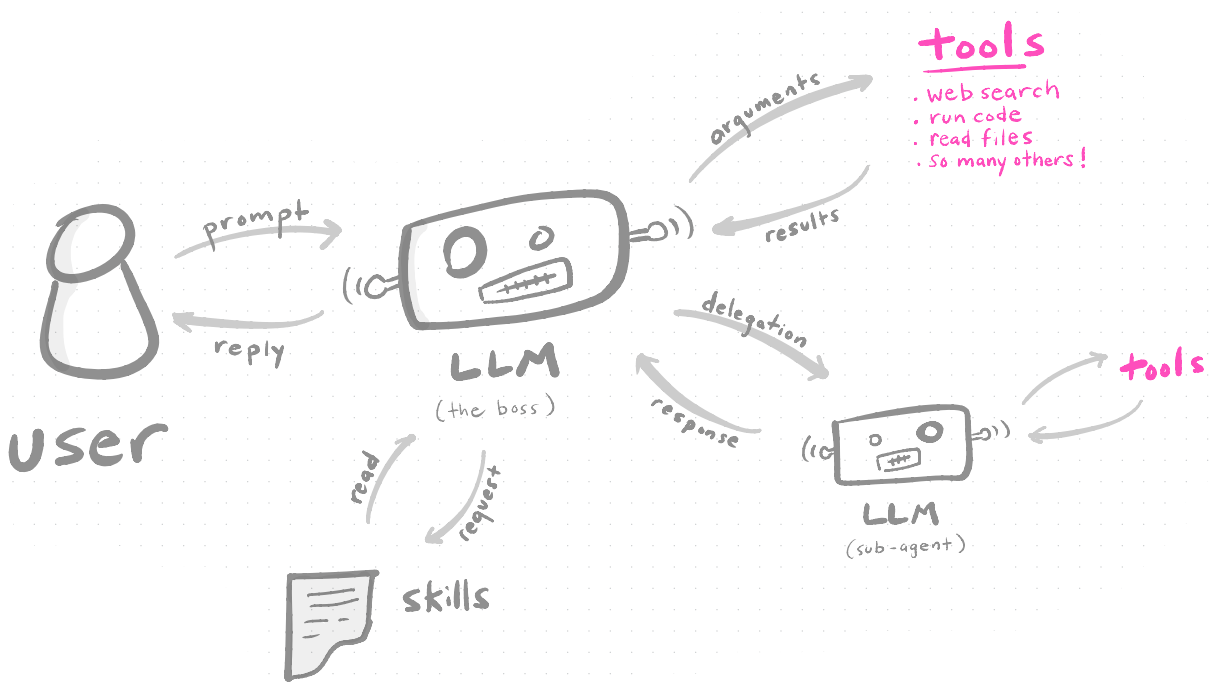
Sweet features:
-
Delegation to sub‑agents
- Each skill can specialize: “researcher”, “planner”, “refactorer”, etc.
-
Upskilling on demand
- You can feed a skill tailored docs, style guides, or examples.
-
Background task management
- Let a skill run longer‑lived tasks.
-
Parallel task execution
- Multiple skills operate at once, then the boss agent integrates results.
Level 4: Extending Agents with MCP Tools
Using the Model Context Protocol (MCP), you can bolt new “superpowers” onto agents like Claude (and others).
Some favorites:
-
- Forces the model to think in a very structured, multi‑step way.
- Good when you want fewer hallucinations and more transparent reasoning.
-
-
Full browser automation:
- Log into sites
- Click through UIs
- Scrape data or screenshots
-
-
- Web search + retrieval tools that act like “deep research” on steroids.
- Great for literature review, competitive analysis, or doc exploration.
-
Codex (Chat with ChatGPT from Claude)
- Fun meta‑tool: let Claude talk to ChatGPT, compare outputs, or combine strengths.
Context Engineering Is the New Prompt Engineering
Prompt engineering used to be mainly about phrasing (“act as an expert…”). Now it’s about managing the entire context window.
Think of a coding session as a stack of context:
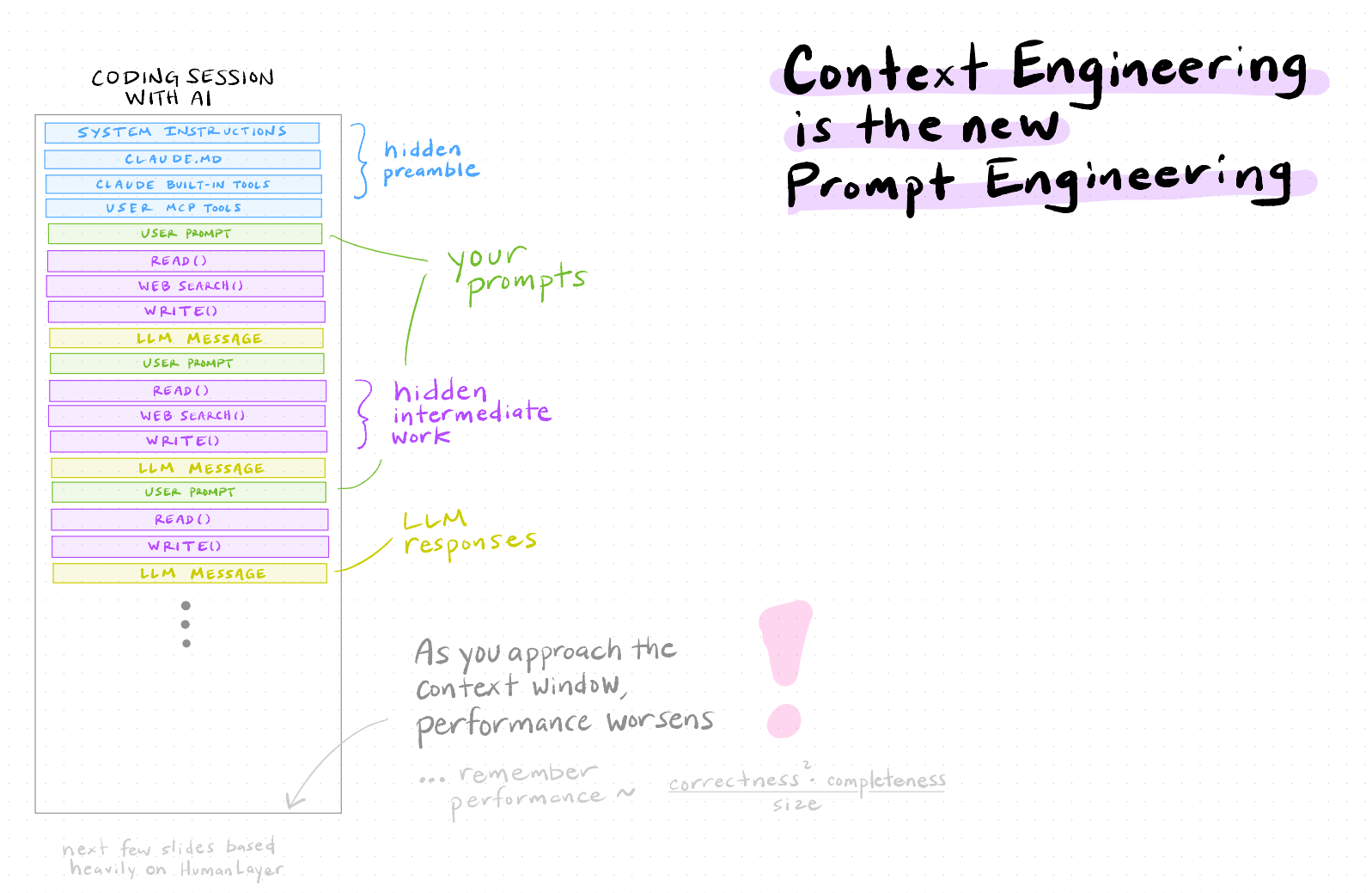
- There’s a hidden preamble: system messages and developer messages you never see.
- There’s hidden intermediate work: tool calls, retrieved docs, scratch notes.
- Then there are your prompts and visible responses.
As you get closer to the context window limit, the model will:
- Drop older messages
- Compress / summarize (auto‑compaction)
- Generally behave less predictably
Remember our rule:
Performance ≈ (correctness² × completeness) ÷ size
Managing size is now a core skill.
Auto‑Compaction: What Happens at the Limit
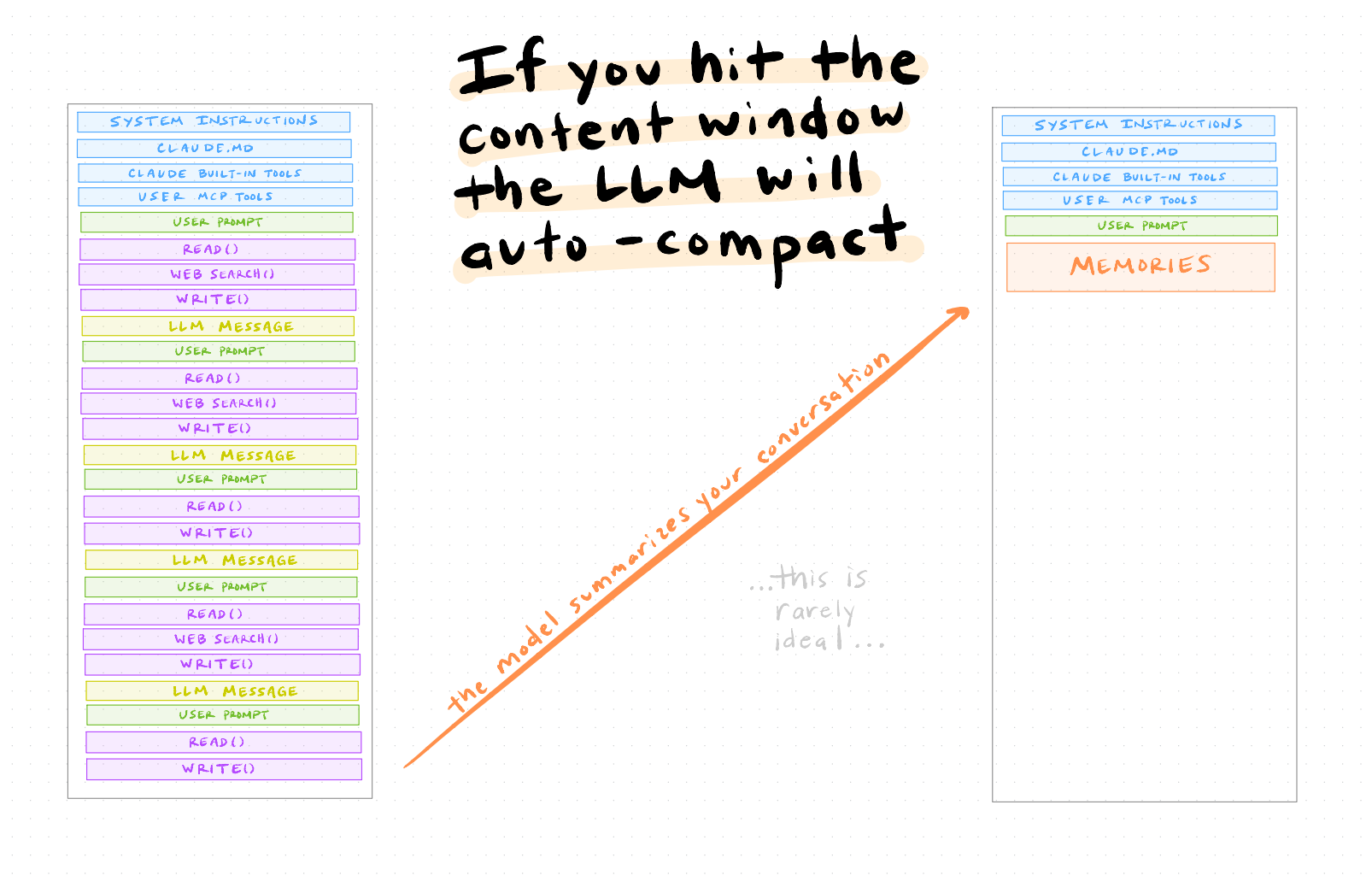
If you just keep chatting in a long session, eventually the LLM will auto‑compact:
- It summarizes earlier parts of the conversation into “memories”.
- Details may be lost or distorted.
- Subtle constraints you set earlier may vanish.
This is rarely ideal for serious coding, where exact requirements and edge cases matter.
Intentional Compaction: A Better Pattern
Instead of letting the model compact for you, you can compact intentionally.
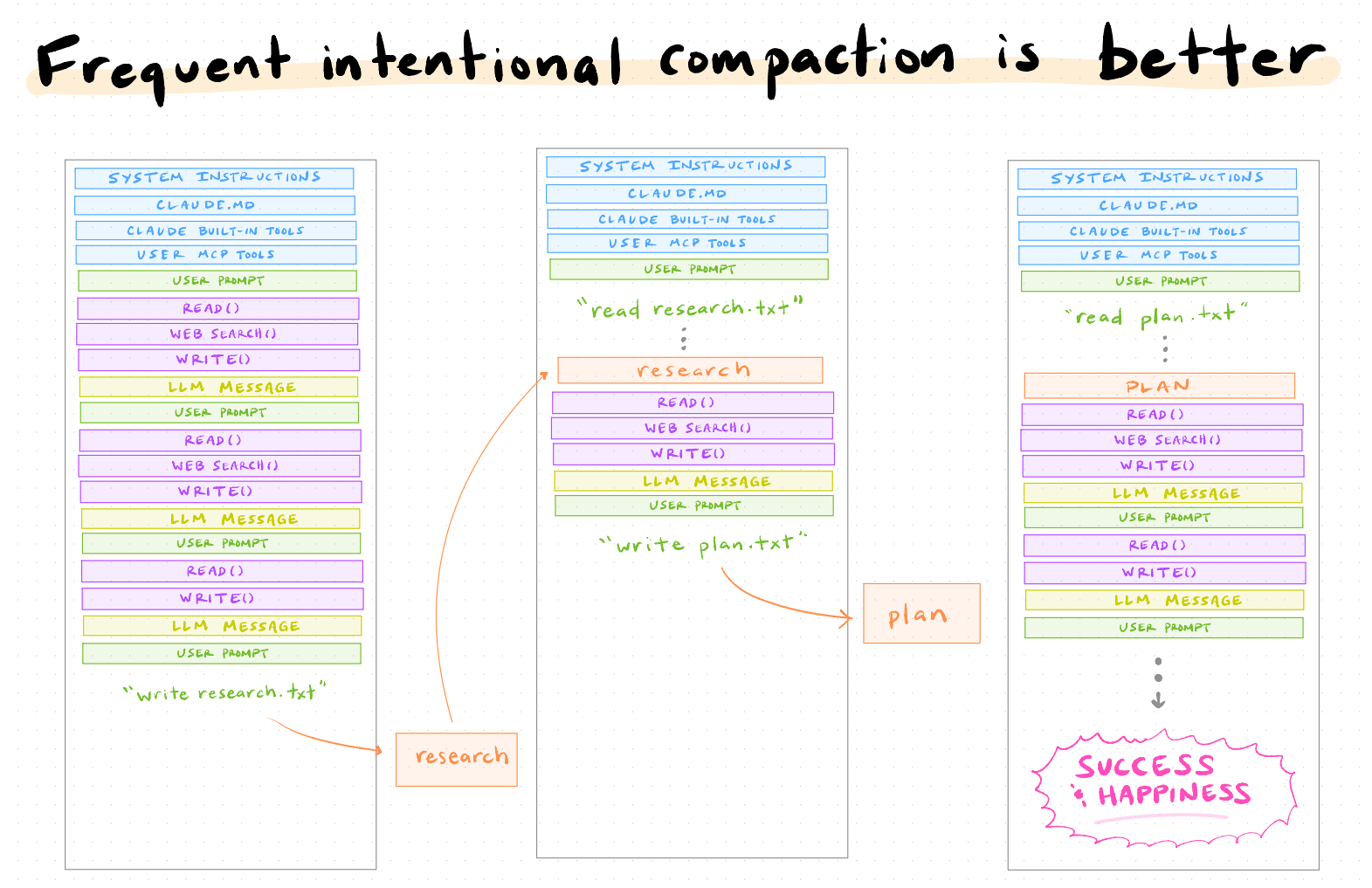
Pattern:
-
Do exploratory research
- “Summarize library options for X.”
- “Audit these modules and note tech debt.”
-
Write artifacts to disk
research.txt,plan.md,design.md, etc.-
Ask the model explicitly:
- “Write a concise research summary to
research.txt.” - “Write an implementation plan to
plan.md.”
- “Write a concise research summary to
-
Restart with a smaller, cleaner context
-
New session:
- “Read
research.txtandplan.md. Then implement step 1.”
- “Read
-
You’re now working with short, precise docs instead of a giant, messy chat log.
Delegation to Sub‑Agents: Best of All
Combine intentional compaction with sub‑agents:
- One sub‑agent (“Researcher”) reads code + docs and writes
research.txt. - Another (“Planner”) reads
research.txtand writesplan.md. - A third (“Implementer”) reads
plan.mdand edits the repo.
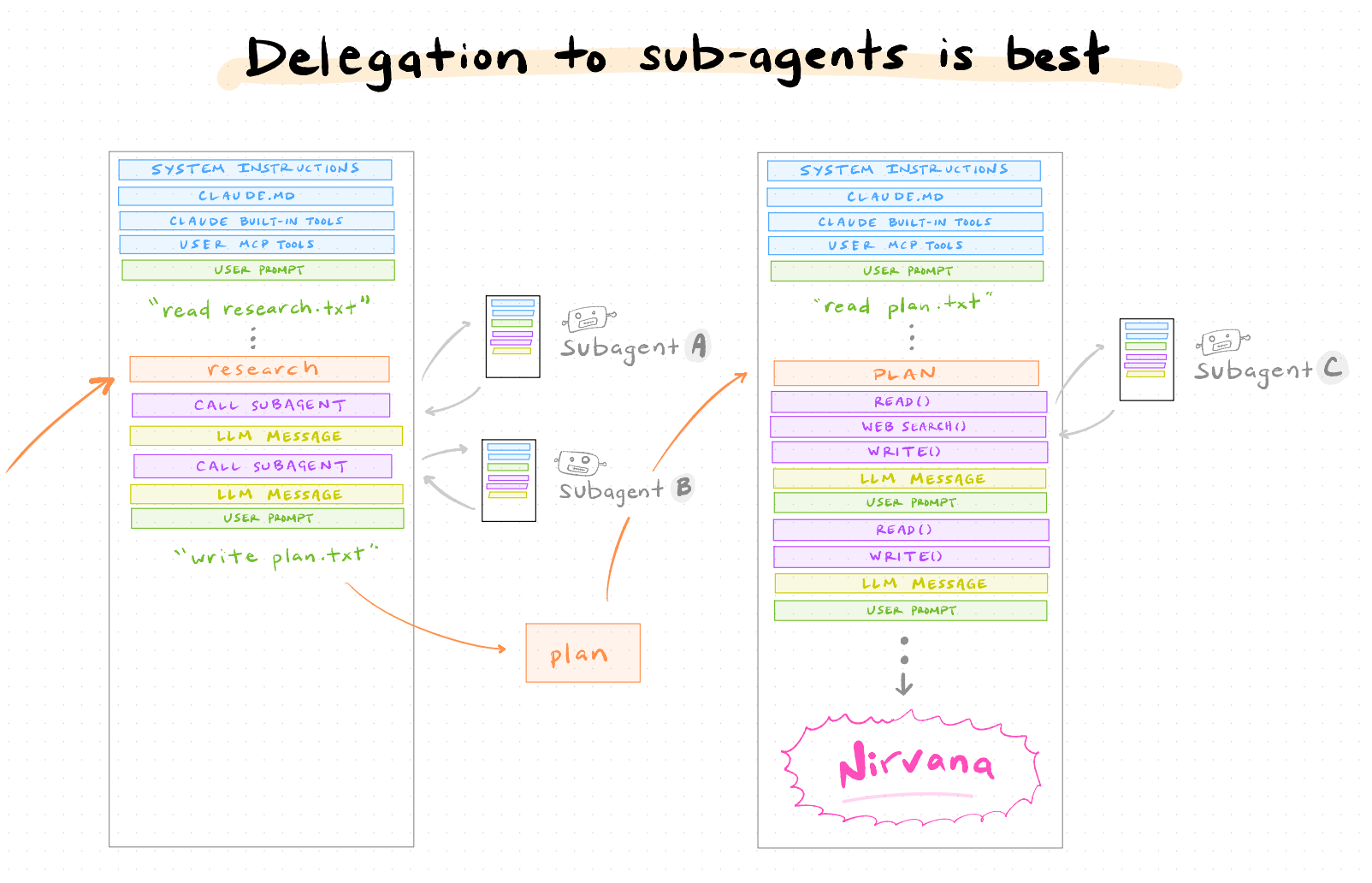
This is where things start to feel like real engineering management:
- You define roles and artifacts.
- Agents handle detailed execution.
- You keep oversight and alignment.
The New Role of Humans in Coding
So… what are humans for now? mental alignment.

Imagine a triangle:
-
Tip: Style
- Preferences, patterns, aesthetic choices.
-
Middle: Other priorities
- Performance, cost, latency, maintainability, compliance.
-
Base: Mental alignment
- Clear goals and shared understanding between you and the model.
- Creating mental alignment with the machine
- Creating the conditions for it to excel:
- Right tools
- Good guardrails
- Clear guidance, specs, and tests
Level 5: YOLO Mode and Safety
“YOLO mode” (let the agent do everything) is fun—and dangerous.
Key risk factors:
-
Access to private data
- Internal repos, databases, customer data.
-
Ability to communicate externally
- Sending emails, posting to Slack, calling APIs, touching production systems.
-
Exposure to untrusted content
- Web pages, email attachments, arbitrary code, user input.
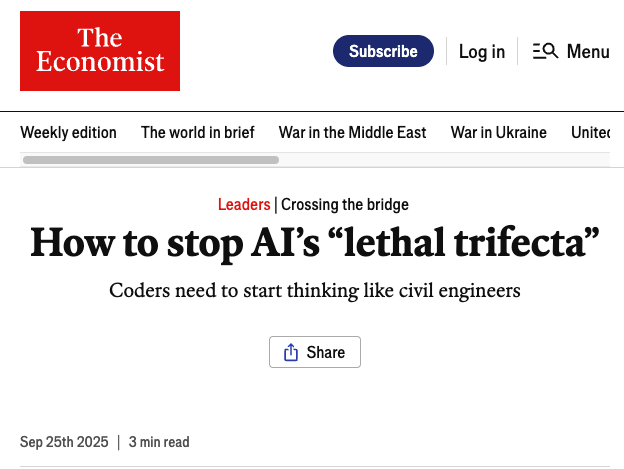
The Economist memorably called these the “lethal trifecta” of AI risk for coders: tools that can read secrets, talk to the world, and execute code.
Treat powerful agents like bridge engineers treat load‑bearing structures:
- Add permissions and approvals.
- Start in read‑only and sandbox modes.
- Test with synthetic or anonymized data.
- Log everything.
If you’re in an institutional environment, pair advanced AI setups with a safety review.